

When is my CE credit reported to the IRS?
FunCPE reporting schedule
FunCPE reports hours every Monday for the week just passed. During December, we report the hours daily.
The IRS usually updates PTIN accounts twice per day, Monday-Friday, so hours should be visible at the end of the day.
- In December we report the hours daily for the prior day, using a midnight cutoff time (CST).
- The IRS is closed on holidays and weekends and does not process our submissions until the next business day.
- The IRS says to allow 24-48 hours after they start processing the submissions for your credits to be displayed in your account, to allow for their periodic system maintenance. (In reality, the credits usually show up much more quickly)
- Your completion date is the date you pass the exam, regardless of when the IRS receives the submission. If you pass the final exam for the course before December 31st, it will count for the current year even though they may not post it to your account until some time in January.
From the IRS website:
How often are CPE Sponsors required to report program completion information to IRS?
During the first nine months
Program completion information must be reported quarterly at a minimum (by March 31, June 30, and September 30).
During the fourth quarter
(October 1 to December 31)
Program completion information must be reported within ten days of completion of each program.
IRS Approved CE Provider Agreement for FunCPE
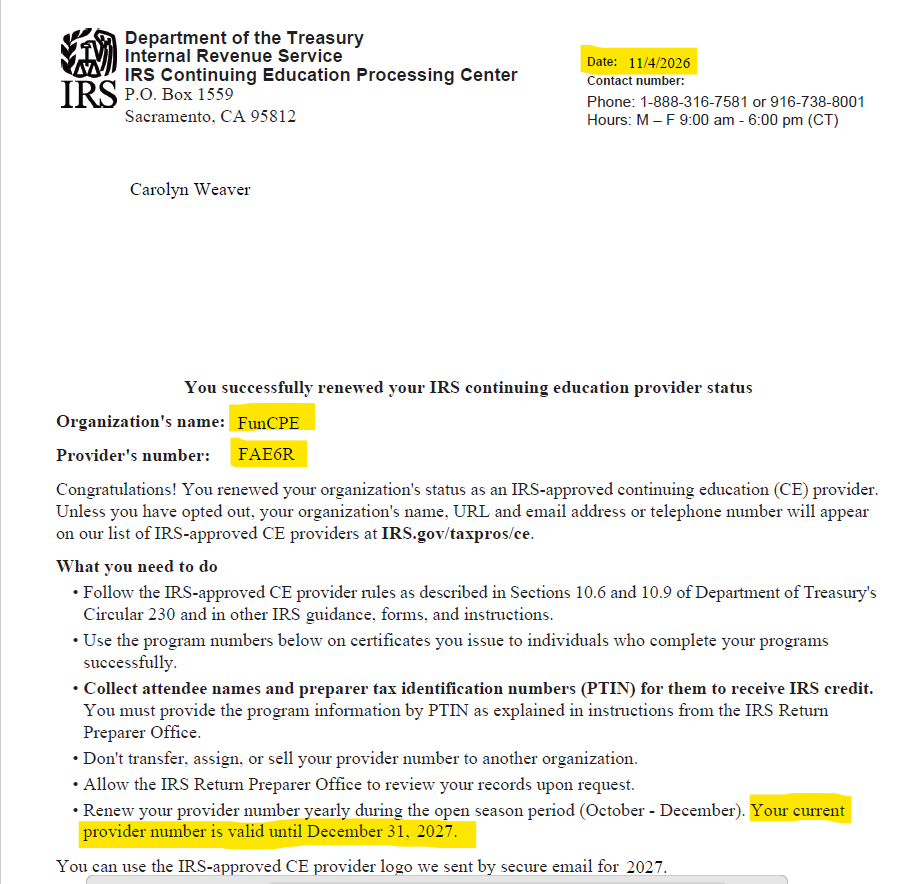
Click to enlarge
IRS CE reporting requirements
The IRS established several new requirements for CE Sponsors starting in 2012, including reporting CE earned by PTIN. FunCPE is now required to request the preparer tax identification number (PTIN) for each student. If you enter a PTIN when you register, we will report your hours to the IRS regardless of what type of professional license you have. If you do not enter a PTIN, we will not report your hours to the IRS.
After we submit our list of credit earned by name and PTIN number, the IRS cross-checks the PTIN number to check for validity. We then receive a notice of invalid PTIN number and/or student name and have the opportunity to submit corrected information.
We collect your email address at registration so that we can contact you if there is a discrepancy. Be sure to use an email address that you check when you register for courses.
FunCPE Reports CE courses completed to the IRS
In accordance with IRS CE Provider requirements, FunCPE will report your courses completed and CE hours earned to the IRS directly. We upload an electronic file to the IRS, rather than sending in actual certificates of completion. The information reported to the IRS is:
- First and last name of student
- Preparer tax identification number (PTIN)
- IRS Program number
- CE hours
- CE program completion date
We ask for your PTIN number when you enroll in a course, as required by the IRS CE reporting requirements.
IRS Commendation for timely reporting
During a 2025 mandatory annual IRS review of our AFSP AFTR course, the IRS noted that we achieved an exceptional 100% on-time submission of student course completions for the program.
Verification of correct reporting of CE hours
PTIN holders can log into their PTIN account to review CE hours reported to the IRS, so you can verify that the correct number of CPE hours has been logged to your account. Please contact us if you notice a discrepancy and we will immediately correct any errors. Most errors and omissions of PTIN hours is due to one of the following:
PTIN does not exist. This can occur if:
- you enter your EA license number or some other number in your FunCPE student profile
- there is a typo in the PTIN or if you use the letter “O” instead of a zero “0.”
- the PTIN is not the right length or missing the letter “P” following by 8 numbers in the format: P12345678
- you obtain a new PTIN, it takes up to 2 weeks for that PTIN to be active in the IRS system–if we submit your CE hours before your new PTIN is active, we get this message.
PTIN / name mismatch.
- if you have changed your name, and the name we have in your student profile is different from the IRS name on your PTIN account. It can take several weeks for the IRS to update your name if you send in the name change request.
- no punctuation is allowed in your name except for hyphens, so omit any commas, apostrophes, periods, accents and circumflexes when you enter your name in the Student Profile of the FunCPE course system and the IRS PTIN system.
How to verify your PTIN and name on the account
Login to your PTIN account to verify the name on the account, and make sure that matches the name in your FunCPE student profile.
When we report your hours, we only use your first and last name, not your middle name or middle initial.
The only characters IRS systems can accept in a name are: alpha (A-Z) and hyphen (-). They cannot accept an accent mark or a circumflex (^). The IRS recommends entering your name with no spaces (Oshay not O’shay).
What if I don’t have a PTIN number?
Effective January 1, 2012, all Enrolled Agents must have a PTIN. Since we provide continuing education to over 30 types of professionals, many of our students to not prepare tax returns and therefore do not have a PTIN number. Our course registration system allows you to enter “none” in the PTIN field if you do not have one.
What CE hours are shown in your PTIN account?
To view your hours from a previous year, you must use a drop down menu selection.
For example in the year 2025, you must use a drop down that says “2024” or “2023” to view the prior year CPE hours reported.
The IRS full year CE reporting started in 2013.
Missing some CE hours in your account?
Contact us! This is often due to a typo in the name or PTIN, but can also occur if you have taken a non-federal tax course, such as the accounting courses we offer to CPAs.
Should Enrolled Agents mail in CE Certificates with license renewal?
No, although you will still report total CE hours earned for each year in your reporting cycle on your renewal Form 8554, you do not mail in your certificates of completion to the IRS. You should keep your certificates in a file, as the IRS does have the right to select you for a CPE audit, in which case they would request copies of these CPE certificates. You can always come back to funcpe.com to reprint your certificates, even after your course is completed or expired.
Exception
If an EA is
- reactivating an inactive Enrolled Agent license or
- otherwise required to submit CPE hours in the middle of a renewal cycle
Proof of CPE hours earned will most likely be required to be sent to the IRS, in the form of copies of CPE certificates. The IRS will notify you by mail if they require you to send copies of certificates.
FunCPE is an IRS Approved CE Provider

CE reported to the IRS weekly on Mondays & daily during December

